Plots
Plots are used to visualize data from one or more reports. VaRA-TS comes with its own plot abstraction that uses pyplot, seaborn and similar for plotting, which can tie plot and research data together to be automatically generated. Here, you can find detailed information about how plots work in VaRA-TS and how to implement your own plots. For an introduction on how to generate plots see this guide.
Plot Architecture
In the following, we describe the architecture of the VaRA-TS plot system. The figure below gives an overview how the command line options are passed through the plot pipeline.
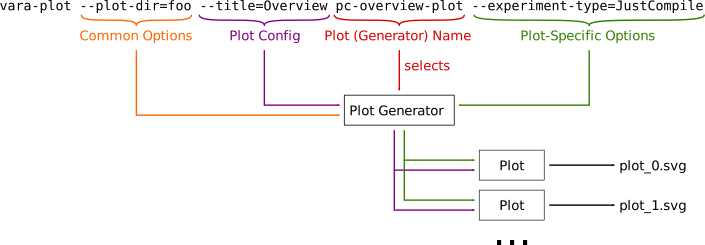
The command line interface for vara-plot consists of four parts:
Common options: handle functionality common to all plots, like file format
Plot config: for tuning visual appearance; specific plots may or may not respect them
Plot generator name: name of the concrete plot generator
Plot- or table-specific options: options specific to a certain plot
Plot generation is handeled by the PlotGenerator classes.
The CLI selects a concrete plot generator via the passed plot generator name and immediately calls its __call__() function (which is implemented by the PlotGenerator itself and must not be overridden by subclasses).
This function also handles the common options (represented by a CommonPlotOptions object) that decide, for example, where to store a plot.
It also calls generate().
This function must be implemented by each concrete plot generator and is responsible for creating and returning one or more Plot instances.
Each Plot instance represents a single plot (or figure, or file).
Since a generator can create multiple plots, this means that a single call to vara-plot can result in multiple files.
To create the plot instances, the plot generator has access to the plot config (represented by a PlotConfig object) and the plot-specific options (as kwargs).
Finally, the plot generator calls the save() or show() function for each returned plot instance depending on the common options.
How to add a new plot in VaRA-TS
To implement a new plot, you need to create at least one subclass of PlotGenerator and one Plot.
Each plot class must override the abstract function plot() that is responsible for generating the plot.
The data for plots should be retrieved using our data storage abstraction.
If your plot uses a plotting framework that is not based on pyplot, you also need to override the functions save() and show() so that they work for the specific plotting framework.
In some cases, it might be necessary to also override the function plot_file_name() to alter how the plot’s file name is generated.
For the plot generator, you need to implement the method generate().
The generator’s generate function must return one or more instances of plot classes that should be generated.
There is no restriction to what plots can be instantiated, but each generator should typically restrict to generating instances of a single plot type.
Plot helper modules
Module: plots
General plots module.
- class varats.plot.plots.CommonPlotOptions(view, plot_dir, file_type, dry_run)[source]
Bases:
objectOptions common to all plots.
These options are handled by the
PlotGeneratorbase class and are not passed down to specific plot generators.- Parameters:
view (
bool) – if True, view the plot instead of writing it to a fileplot_dir (
Path) – directory to write plots to (relative to config value ‘plots/plot_dir’)file_type (
str) – the file type for the written plot filedry_run (
bool) – ifTrue, do not generate any files
- static from_kwargs(**kwargs)[source]
Construct a
CommonPlotOptionsobject from a kwargs dict.- Return type:
- class varats.plot.plots.PlotConfig(view, *options)[source]
Bases:
objectClass with parameters that influence a plot’s appearance.
Instances should typically be created with the
from_kwargs()function.- classmethod from_kwargs(view, **kwargs)[source]
Instantiate a
PlotConfigobject with values from the given kwargs.- Parameters:
**kwargs (
Any) – a dict containing values to be used by this config- Return type:
- Returns:
a plot config object with values from the kwargs
- exception varats.plot.plots.PlotGeneratorFailed(message)[source]
Bases:
ExceptionException for plot generator related errors.
- class varats.plot.plots.PlotGenerator(plot_config, **plot_kwargs)[source]
Bases:
ABCSuperclass for all plot generators.
A plot generator is responsible for generating one or more plots. Subclasses are automatically registered if they reside in the
varats.plotspackage and must override the functiongenerate()so that it returns one or more plot instances that should be generated. The generation itself (i.e., saving or displaying plots) is handeled by the call operator (which should not be overridden!).Creating a plot generator class requires to provide additional parameters in the class definition, e.g.:
class MyPlotGenerator(
    PlotGenerator,
    generator_name="my_generator",  # generator name as shown by CLI
    options=[]  # put CLI option declarations here
):
    ...
- GENERATORS: Dict[str, Type[PlotGenerator]] = {}
Registry for concrete plot generators.
- NAME: str
Name of the concrete generator class (set automatically).
- OPTIONS: List[Callable[[Callable[[...], Any] | Command], Callable[[...], Any] | Command]]
Plot generator CLI Options (set automatically).
- static get_plot_generator_types_help_string()[source]
Generates help string for visualizing all available plots.
- Return type:
str- Returns:
a help string that contains all available plot names.
- static get_class_for_plot_generator_type(plot_generator_type_name)[source]
Get the class for plot from the plot registry.
- Parameters:
plot_generator_type_name (
str) – name of the plot generator- Return type:
Type[PlotGenerator]- Returns:
the class for the plot generator
- property plot_config: PlotConfig
Options that influence a plot’s appearance.
- property plot_kwargs: Dict[str, Any]
Plot-specific options.
- class varats.plot.plots.PlotArtefact(name, output_dir, plot_generator_type, common_options, plot_config, **kwargs)[source]
Bases:
ArtefactAn artefact defining a
Plot.- Parameters:
name (
str) – name of this artefactoutput_dir (
Path) – output dir relative to config value ‘artefacts/artefacts_dir’plot_generator_type (
str) – thetype of plotto usefile_format – the file format of the generated plot
kwargs (
Any) – additional arguments that will be passed to the plot class
- property plot_generator_type: str
The type of plot generator used to generate this artefact.
- property plot_generator_class: Type[PlotGenerator]
The class associated with
plot_generator_type().
- property common_options: CommonPlotOptions
Options that are available to all plots.
- property plot_config: PlotConfig
Options that influence the visual representation of a plot.
- property plot_kwargs: Any
Additional arguments that will be passed to the plot.
- get_dict()[source]
Create a dict representation for this object.
- Return type:
Dict[str,Any]- Returns:
a dict representation of this object
- static create_artefact(name, output_dir, **kwargs)[source]
Create an artefact instance from the given information.
- Parameters:
name (
str) – the name of the artefactoutput_dir (
Path) – the output directory for the artefact**kwargs (
Any) – artefact-specific arguments
- Return type:
- Returns:
an artefact instance
- ARTEFACT_TYPE = 'plot'
- ARTEFACT_TYPE_VERSION = 2
- static from_generator(name, generator, common_options)[source]
Create a plot artefact from a generator.
- Parameters:
name (
str) – name for the artefactgenerator (
PlotGenerator) – generator class to use for the artefactcommon_options (
CommonPlotOptions) – common plot options
- Return type:
- Returns:
an instantiated plot artefact
- get_artefact_file_infos()[source]
Retrieve information about files generated by this artefact.
- Return type:
List[ArtefactFileInfo]- Returns:
a list of file info objects
Module: plot
Base plot module.
- exception varats.plot.plot.PlotDataEmpty[source]
Bases:
ExceptionThrow if there was no input data for plotting.
- class varats.plot.plot.Plot(plot_config, **kwargs)[source]
Bases:
objectAn abstract base class for all plots generated by VaRA-TS.
- NAME = 'Plot'
- static get_plot_types_help_string()[source]
Generates help string for visualizing all available plots.
- Return type:
str- Returns:
a help string that contains all available plot names.
- static get_class_for_plot_type(plot_type)[source]
Get the class for plot from the plot registry.
- Parameters:
plot_type (
str) – The name of the plot.- Return type:
Type[Plot]
Returns: The class implementing the plot.
- property name: str
Name of the current plot.
Test: >>> Plot(PlotConfig.from_kwargs(view=False)).name ‘Plot’
- property plot_config: PlotConfig
Plot config for this plot.
- property plot_kwargs: Any
Access the kwargs passed to the initial plot.
Test: >>> p = Plot(PlotConfig.from_kwargs(view=False),foo=’bar’,baz=’bazzer’) >>> p.plot_kwargs[‘foo’] ‘bar’ >>> p.plot_kwargs[‘baz’] ‘bazzer’
- static supports_stage_separation()[source]
True, if the plot supports stage separation, i.e., the plot can be drawn separating the different stages in a case study.
- Return type:
bool
- plot_file_name(filetype)[source]
Get the file name this plot; will be stored to when calling save.
- Parameters:
filetype (
str) – the file type for the plot- Return type:
str- Returns:
the file name the plot will be stored to
Test: >>> p = Plot(PlotConfig.from_kwargs(view=False),project=’bar’) >>> p.plot_file_name(‘svg’) ‘bar_Plot.svg’ >>> from varats.paper.case_study import CaseStudy >>> p = Plot(PlotConfig.from_kwargs(view=False), project=’bar’, case_study=CaseStudy(‘baz’, 42)) >>> p.plot_file_name(‘png’) ‘baz_42_Plot.png’
- save(plot_dir, filetype='svg')[source]
Save the current plot to a file.
- Parameters:
plot_dir (
Path) – the path where the file is stored (excluding file name)filetype (
str) – the file type of the plot
- Return type:
None
- abstractmethod calc_missing_revisions(boundary_gradient)[source]
Calculate a list of revisions that could improve precisions of this plot.
Raises an
UnsupportedOperationif not supported by a plot.- Parameters:
boundary_gradient (
float) – The maximal expected gradient in percent between two revisions, every thing that exceeds the boundary should be further analyzed.- Return type:
Set[FullCommitHash]
Module: plot_utils
Plot module for util functionality.
- varats.plot.plot_utils.find_missing_revisions(data, git_path, cmap, should_insert_revision, to_commit_hash, are_neighbours)[source]
Calculate a set of revisions that could be missing because the changes between certain points are to steep.
- Return type:
Set[FullCommitHash]
- varats.plot.plot_utils.pad_axes(ax, pad_x=None, pad_y=None)[source]
Add some padding to the axis limits.
- Return type:
None
- varats.plot.plot_utils.align_yaxis(ax1, value1, ax2, value2)[source]
Adjust ax2 ylimit so that value2 in ax2 is aligned to value1 in ax1.
See https://stackoverflow.com/a/26456731
- Return type:
None
- varats.plot.plot_utils.adjust_yaxis(ax, ydif, value)[source]
Shift axis ax by ydiff, maintaining point value at the same location.
See https://stackoverflow.com/a/26456731
- Return type:
None