vara-plot
This tool is used to generate Plots.
usage: vara-plot [-h] [-r RESULT_OUTPUT] [-p PROJECT] [-c CMAP] [-v]
                 [--cs-path CS_PATH] [--paper-config] [--sep-stages]
                 [--report-type REPORT_TYPE]
                 plot_type ...

positional arguments:
  plot_type             Plot to generate.The following plots are available:
                        b_cluster_analysis b_correlation_matrix
                        b_distribution_comparison repo_churn
                        blame_library_interaction blame_degree
                        b_interaction_degree b_interaction_degree_multi_lib
                        b_interaction_fraction_overview
                        b_multi_lib_interaction_sankey_plot
                        b_multi_lib_interaction_graphviz b_author_degree
                        b_maxtime_distribution b_avgtime_distribution
                        b_lorenz_curve b_gini_overtime
                        case_study_overview_plot blame_verifier_report_plot
                        b_verifier_report_no_opt_plot
                        b_verifier_report_opt_plot interaction_graph
                        paper_config_overview_plot
  KEY=VALUE             Provide additional arguments that will be passed to
                        the plot class. (do not put spaces before or after the
                        '=' sign). If a value contains spaces, you should
                        define it with double quotes: foo="bar baz".

optional arguments:
  -h, --help            show this help message and exit
  -r RESULT_OUTPUT, --result-output RESULT_OUTPUT
                        Set the output folder for plot files
  -p PROJECT, --project PROJECT
                        Project name
  -c CMAP, --cmap CMAP  Path to commit map
  -v, --view            Show the plot instead of saving it
  --cs-path CS_PATH     Path to case_study
  --paper-config        Generate plots for all case studies in the current
                        paper config
  --sep-stages          Separate different stages of case study in the plot.
  --report-type REPORT_TYPE
                        The report type to generate the plot for.Plots may
                        ignore this option.
Available plots
Paper config overview plot
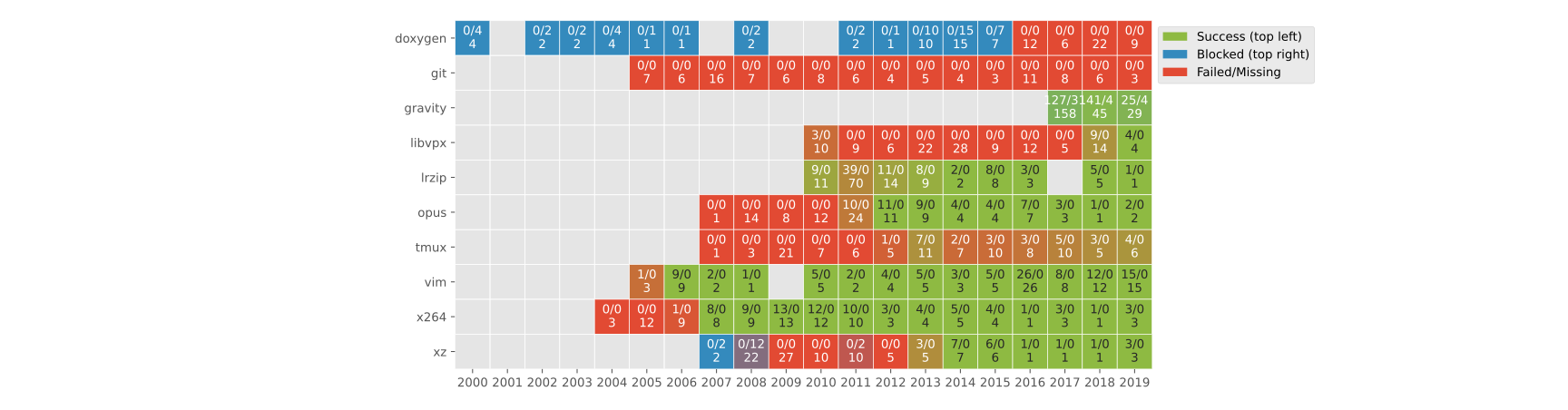
This plot gives an overview of the status of the experiment runs for the current paper config. The information in this plot is similar to what you get from vara-cs status.
- class varats.plots.paper_config_overview.PaperConfigOverviewPlot(**kwargs)[source]
Plot showing an overview of current experiment results for the current paper config.
Plots a matrix with the analyzed projects as rows and the sampled revisions grouped by year as columns. Each cell represents the sampled revisions for a project in a specific year. The numbers in the cell are the number of successfully analyzed (top left), blocked (top right), and total number of sampled revisions (bottom). The color of the cell indicates the ratio between these three values. The greener a cell, the more revisions were successfully analyzed, analogous for red (failed or missing) and blue (blocked).
- NAME = 'paper_config_overview_plot'
The plot can be obtained via:
vara-plot --report-type <report_type> paper_config_overview_plot
Where <report_type> is the type of report your experiments produce.